

User manual and frequently asked questions OPTIGRILL ELITE GR750
Référence : GR750D21
Voir les documents liés


Voir les questions les plus fréquentes
FAQ
We recommend that you pre-wash your cooking plates in the following manner before putting them in the dishwasher to remove any food residue:
- Soak the plates in hot water and degreasing dish soap for about 30 minutes,
- Scrub both sides of the plate with a sponge or a dish brush, hot water and degreasing dish soap,
- Rinse,
- Put in the dishwasher.
or
Press the on/off button once and confirm with OK.
• Step 1: Ensure the Optigrill is plugged into the wall socket and switched on from the mains.
• Step 2: Press the Power button once AND IMMEDIATELY press the Frozen Food button.
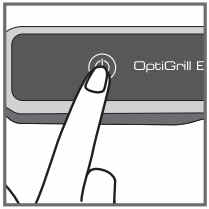
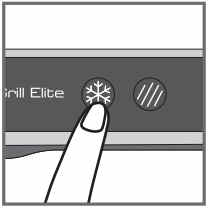
NB: the language can only be changed whilst the display states "Hello". The "Hello" status will only be active for approximately 2 seconds once the machine is switched on.
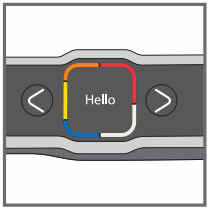
• Step 3: Toggle through the languages by pressing the cursor arrows and once you have selected the correct language, press the OK button.
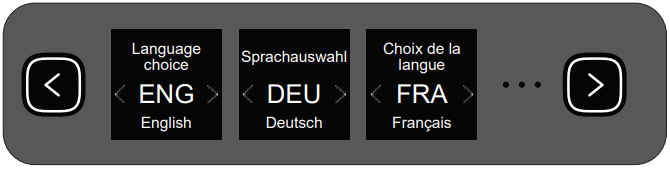
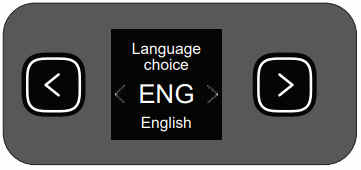
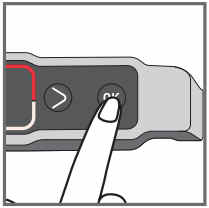
NB: If you have not followed Step 2 in the allotted time, switch off the machine via the Power button and repeat Step 2 ensuring it is done within the 2 seconds.
Unplug the device and wait a few minutes.
Plug the device in again and press on/off.
If the problem persists, contact Customer Service.
Unplug the device and wait a few minutes.
Plug the device in again and press on/off.
If the problem persists, contact Customer Service.
Unplug the device and wait a few minutes.
Plug the device in again and press on/off.
If the problem persists, contact Customer Service.
Unplug the device and wait a few minutes.
Plug the device in again and press on/off.
If the problem persists, contact Customer Service.
Unplug the device and wait a few minutes.
Plug the device in again and press on/off.
If the problem persists, contact Customer Service.
Unplug the device and wait a few minutes.
Plug the device in again and press on/off.
If the problem persists, contact Customer Service.
Unplug the device and wait a few minutes.
Plug the device in again and press on/off.
If the problem persists, contact Customer Service.
Unplug the device and wait a few minutes.
Plug the device in again and press on/off.
If the problem persists, contact Customer Service.
Press OK if all food has been removed.
or
Do not press OK and leave food to cook a little longer.
Unplug the device and wait a few minutes. Then plug your device in again and turn it on.
Press OK once to go to the time setting and then adjust with the arrows. Press OK to confirm.
Press OK to continue cooking in manual mode.
or
Remove food and cut thinner to reduce the thickness, in order to allow cooking in automatic mode.


